
TL;DR:
- Effective live chat management combines pre-configured tools, layered automation, and trained moderators to maintain a lively, safe community. Proper setup before streaming and clear workflows during broadcasts help prevent chaos and foster engagement. Balancing automation with human oversight ensures responsive, context-aware moderation that sustains viewer loyalty.
Live chat moves fast. During a peak broadcast, hundreds of messages per minute can flood the screen, and knowing how to manage live chats is what separates a chaotic stream from a thriving community. Most creators underestimate the operational side of chat until their first major spike in viewers. A hostile comment slips through, spam drowns out real questions, and the streamer loses focus entirely. This guide covers the tools, strategies, and workflows that give you control without killing the energy your audience actually came for.
Table of Contents
- Key Takeaways
- How to manage live chats: tools and setup
- Step-by-step chat moderation during streams
- Balancing automation and human moderation
- Optimizing engagement through chat
- Troubleshooting common chat problems
- My take on managing high-traffic stream chats
- Start streaming smarter with Vexiotv
- FAQ
Key Takeaways
| Point | Details |
|---|---|
| Set up tools before going live | Configure chat modes, bots, and moderation roles before your stream starts to avoid scrambling mid-broadcast. |
| Layer automation with human oversight | Use bots for high-confidence removals and reserve human mods for nuanced or ambiguous situations. |
| Chat modes control volume spikes | Slow mode, follower-only, and subscriber-only modes reduce spam and protect chat quality during peak traffic. |
| Shared context improves mod efficiency | Giving moderators access to chat history prevents repeated questions and speeds up response decisions. |
| Engagement turns viewers into community | Using chat for Q&A, polls, and direct responses builds loyalty and keeps audiences coming back. |
How to manage live chats: tools and setup
Before you go live, you need the right foundation. Live chat moderation, which the industry also calls real-time content moderation, starts with the software and roles you configure before the stream begins.
Choosing your chat tools
Most platforms include built-in chat management features, but dedicated moderation bots extend what those tools can do. Bots like Nightbot, Streamlabs Chatbot, and Moobot let you automate spam filters, set up commands, and create custom responses. These live chat tools for support and moderation handle the repetitive work so you and your team can focus on the actual broadcast.
Here is what to set up before your first stream:
- Chat widget and display settings. Configure how chat appears on screen and decide what viewers see in your overlay.
- Keyword and phrase filters. Block slurs, spam phrases, and promotional links automatically.
- Slow mode delay. Set a message interval, typically between 3 and 30 seconds, to control the pace.
- Automated welcome messages. Greet new followers or first-time chatters without lifting a finger.
- Moderator roles. Assign trusted community members as mods before the stream starts, not during it.
Routing chats based on topic and knowing viewer context before the conversation starts boosts moderator productivity and reduces repetitive questions. The same principle applies to live streams. Know your audience makeup and set your tools accordingly.
Pro Tip: Create a pre-stream checklist that covers bot settings, mod confirmations, and chat rules review. Run through it 15 minutes before every broadcast.
Setting clear response expectations upfront lets you triage incoming messages based on priority rather than treating every comment as equally urgent. For live chat customer service in a streaming context, this means acknowledging high-value interactions like donations, questions, or first-time viewers before casual banter.
Step-by-step chat moderation during streams
Good strategies for live chat success do not happen by accident. They follow a clear workflow that your entire mod team understands before anyone goes live.
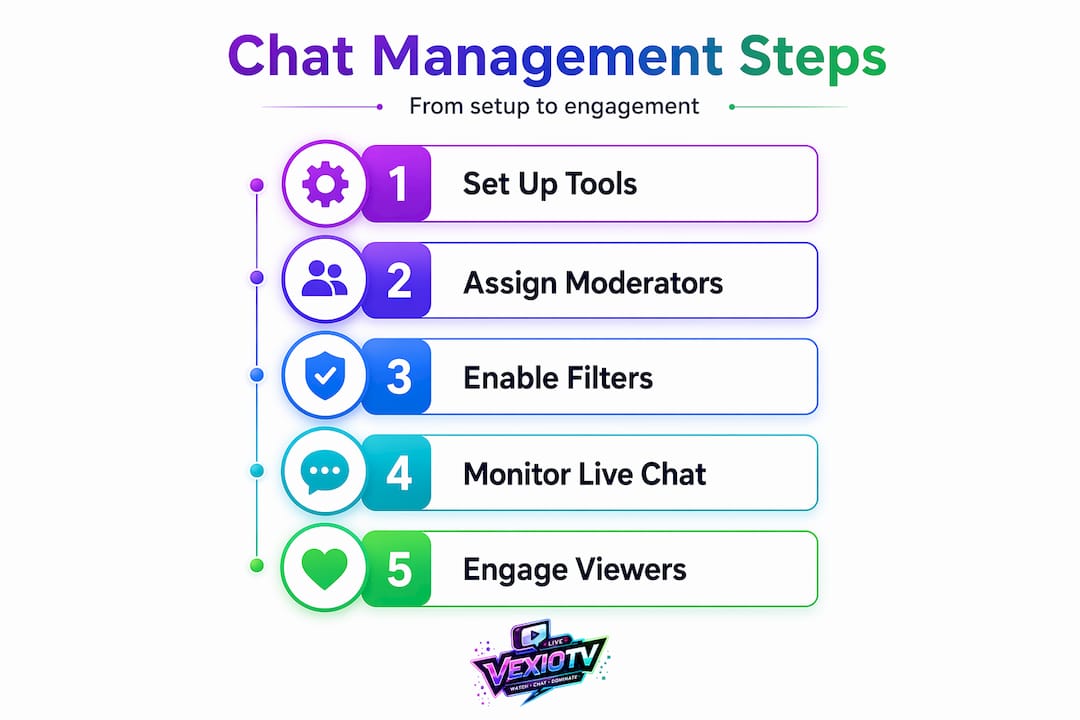
- Post your chat rules visibly. Pin a message at the top of chat listing your core rules. Keep it short. Viewers do not read walls of text.
- Activate the appropriate chat mode. Chat modes like slow mode and follower-only reduce spam and give moderators breathing room during volume spikes. Start with slow mode for most streams and upgrade restrictions if chat gets unruly.
- Use timeout commands for first offenses. Moderation commands like /timeout let you issue temporary 10 or 30-minute restrictions before moving to a permanent ban. This gives rule-breakers a chance to correct behavior.
- Escalate to bans only when necessary. Save permanent bans for harassment, hate speech, or repeated violations. Overusing bans creates a culture of fear that discourages participation.
- Assign specific roles to each mod. One mod monitors new users. Another handles spam. A third watches for ban-worthy behavior. Clear roles prevent gaps and redundancies.
- Brief your team before going live. Review any sensitive topics planned for the stream and confirm your escalation plan. Pre-planned escalation matrices that define moderator actions and creator responsibilities prevent situations from spiraling during a live broadcast.
- Check in with mods mid-stream. A quick message during a break or between segments keeps communication open and catches issues early.
Pro Tip: Set up a private Discord channel or group chat for your mod team. Real-time communication between mods during a stream closes the gaps that slow individual reaction creates.
Multi-layered moderation uses automated classifiers with confidence scoring alongside human review for ambiguous cases. High-velocity chat environments need instant decisions. Splitting the workload between bots and humans based on confidence thresholds is how professional moderation teams stay ahead of chat volume.
Balancing automation and human moderation
The biggest mistake in managing customer interactions during a live stream is going fully automated or fully manual. Both extremes create problems. Over-automation removes context-dependent comments that were harmless. Under-automation lets your mods burn out within an hour of a three-hour stream.
The solution is a layered model. Here is how to think about it:
| Situation | Who handles it | Why |
|---|---|---|
| Clear spam or slur | Automated bot | Speed matters; no ambiguity needed |
| First-time rule violation | Human moderator | Context and intent change the right response |
| Sensitive topic comment | Human moderator + creator decision | Requires judgment and community awareness |
| Repeated low-level offense | Bot timeout, mod monitors | Consistent enforcement without mod fatigue |
| Donation or gifted sub | Creator or senior mod | High-value interaction deserves personal response |
Shared chat history and context between bots and human mods markedly improves viewer experience and moderation efficiency. When a mod takes over a flagged conversation, they should see the full thread, not just the offending message.
Canned responses improve response speed but should be personalized to avoid a robotic tone. For example, instead of "Thank you for your question," try "Great question on that boss fight, here is what worked for me." The information is the same. The impact is completely different.
Additional practices that keep the balance working:
- Review your bot's flagged-and-removed log after each stream. False positives tell you where to adjust your filters.
- Rotate mods on longer streams to prevent fatigue from affecting judgment.
- Let bots handle volume; let humans handle tone.
Optimizing engagement through chat
Chat is not just a place to moderate. It is one of the most direct tools you have for building audience engagement and turning casual viewers into regular community members.
Use these methods to make chat an active part of your stream rather than a passive feed running in the background:
- Run live Q&A segments. Block out five minutes at a set time in your stream where you read and answer chat questions directly. Viewers show up just for these moments.
- Use polls tied to your content. Ask chat to vote on what happens next in a game, which song you play, or what topic to cover. Real choices drive real investment.
- Call out usernames directly. Reading a viewer's name on stream has an outsized effect on loyalty. It takes two seconds and tells that person they matter.
- Set clear participation expectations early. Tell chat what you want from them. "Drop a one-word description of your day" gets more responses than "chat with me."
- Integrate overlays that display chat activity. Tools that show top chatters or reactions on screen reinforce the idea that participation is visible and valued.
Pro Tip: Pin a "question of the day" at the start of every stream. It gives new viewers an immediate way to participate and seeds early chat activity before your regular audience arrives.
Collecting viewer context upfront and personalizing interactions around it helps creators respond faster and with more relevance. If you know a viewer is a first-timer, acknowledge it. If a regular shows up, recognize them. Small gestures compound into strong community loyalty over time.
Troubleshooting common chat problems
Even well-prepared streams run into issues. Knowing how to spot and fix problems quickly is part of improving live chat response time and keeping your stream quality consistent.
Watch for these red flags during and after streams:
- Message volume overwhelming mods. If mods are visibly falling behind, activate subscriber-only or follower-only mode immediately to cut volume.
- Bot false positives spiking. If your bot is removing normal comments, your keyword filters are too broad. Audit the log and narrow your rules.
- Moderator fatigue. Quiet mods or slow response times mid-stream signal burnout. Rotate or add mods if your audience is growing.
- Repeat offenders cycling back. If banned users return under new accounts, use IP-level tools your platform offers or tighten follower-age requirements for chat access.
Real-time moderation that balances automation and human review prevents over-removal while maintaining safety in fast-moving chats. After each stream, spend 10 minutes reviewing your chat analytics. Look at message volume by time segment, moderator actions taken, and any complaint patterns. These numbers tell you where your setup is working and where it needs adjustment.
AI-powered content detection analyzes text, audio, and visuals in real time to catch violations that manual review misses at speed. As your audience grows, consider platforms or plugins that incorporate these multi-modal tools into your moderation workflow.
My take on managing high-traffic stream chats
I've watched creators lose their best streams to chat chaos because they treated moderation as an afterthought. In my experience, the setup you do before going live determines about 80 percent of how well chat runs during the actual broadcast.
What I've learned from watching high-traffic streams is that the creators who handle chat best are not the ones with the strictest rules. They're the ones with the clearest systems. Their mods know exactly what to do without being asked. Their bots are tuned well enough that false positives are rare. And the creator themselves checks in with chat deliberately rather than constantly, which actually makes those moments feel more special.
The uncomfortable truth is that over-moderation kills communities faster than under-moderation does. Viewers who feel watched instead of welcomed stop participating. When that happens, your chat becomes a ghost town even when the viewer count is high.
My suggestion for scaling: add one moderator for every 100 concurrent viewers you consistently hit. Train them with written guidelines, not verbal instructions. And revisit your bot's filter settings every month because your audience changes, and your moderation rules should too.
— M7
Start streaming smarter with Vexiotv
Managing chat well starts with a platform that supports your workflow from the first click. Vexiotv gives creators a direct path to going live with the tools and community structure that make chat moderation easier from day one. Whether you stream gaming, music, or IRL content, Vexiotv is built to support interactive streams where chat is a feature, not a distraction. Sign up, go live, and bring your moderation setup into a platform designed for creators who take their community seriously.
FAQ
What does effective live chat management look like?
Effective live chat management combines configured chat modes, automated filters, and trained human moderators working from clear escalation guidelines. It keeps harmful content out while keeping genuine viewer interaction flowing.
How many moderators do I need for my stream?
A general rule is one active moderator per 100 concurrent viewers for mid-sized streams. For smaller audiences, one reliable mod is enough provided your bot handles spam automatically.
What chat modes reduce spam the fastest?
Follower-only and subscriber-only modes cut spam volume immediately by limiting who can post. Slow mode is a lighter option that reduces message frequency without restricting access.
How do I handle sensitive topics in chat?
Setting SOPs and escalation plans before streaming sensitive content gives moderators defined actions and reduces improvised decisions that often make situations worse.
Can bots replace human moderators entirely?
No. Bots handle high-confidence, clear-cut violations quickly, but human moderators are needed for context-dependent situations where tone, intent, or community norms change the right call.