
TL;DR:
- Multistreaming allows live broadcasts on multiple platforms, increasing audience reach and engagement.
- It can be set up using cloud services or local encoding, with cloud options being beginner-friendly.
- Effective multistreaming accelerates follower growth, diversifies revenue streams, and enhances discoverability.
Most streamers spend months or years building an audience on a single platform, only to realize growth has plateaued. The fix is simpler than most expect. Multistreaming, which means broadcasting your live stream to several platforms at the same time, gives you access to entirely different viewer bases without adding extra work to your schedule. This guide explains what multistreaming is, how it works technically, why it drives faster growth, and how you can set it up. Whether you stream games, music, or IRL content, this breakdown covers everything you need to get started.
Table of Contents
- Defining multistreaming for creators
- How multistreaming works: technical foundations
- Why multistream: audience growth and engagement
- Practical steps and pro tips for multistreaming success
- The overlooked realities of multistreaming
- Ready to elevate your live streaming?
- Frequently asked questions
Key Takeaways
| Point | Details |
|---|---|
| What multistreaming is | Multistreaming means broadcasting your live content to several platforms at the same time. |
| Key methods | You can multistream using local encoding software or cloud platforms tailored for creators. |
| Audience growth | Multistreaming lets you reach new fans, boost engagement, and grow your presence faster. |
| Common pitfalls | Lack of preparation for chat management and bandwidth needs can hurt your viewer experience. |
| Getting started | Start with cloud-based multistreaming for simplicity and scale as your audience grows. |
Defining multistreaming for creators
Now that you know why going beyond a single platform matters, it's time to define exactly what multistreaming is.
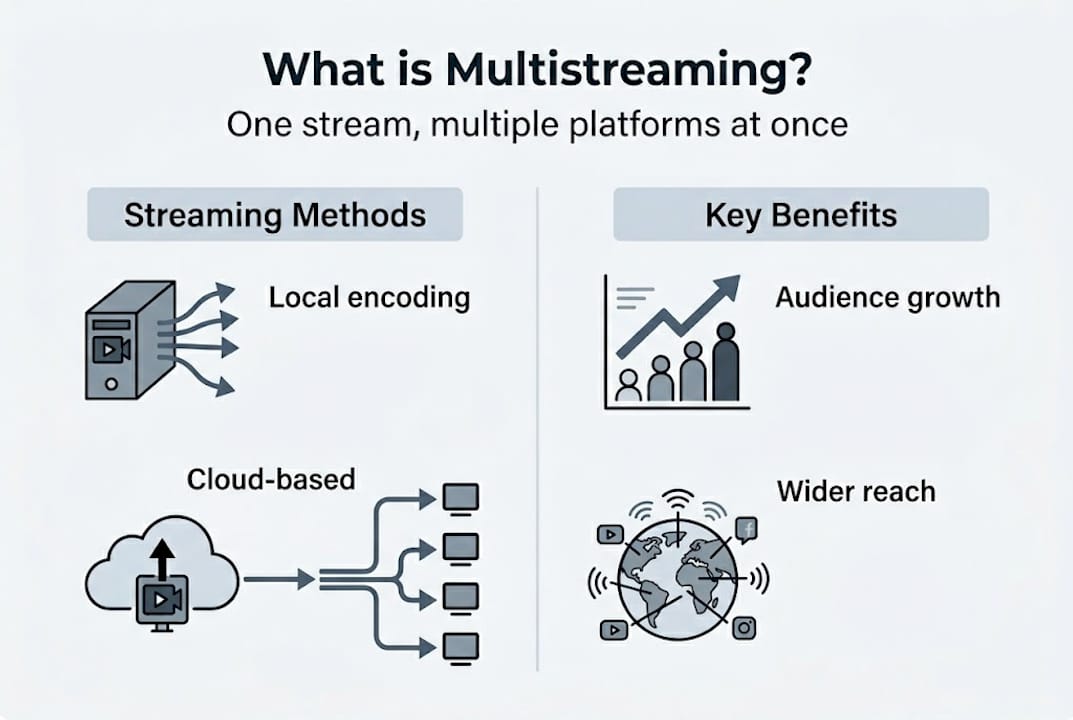
Multistreaming means you send one live broadcast to multiple streaming platforms at the same time. Instead of going live only on Twitch, you can simultaneously stream to YouTube, Facebook, and other platforms with a single setup. As multilogin.com notes, "multistreaming delivers live content to multiple platforms simultaneously," which instantly multiplies your potential audience size.
Many creators assume that focusing on one platform produces faster growth. This thinking is understandable, but it limits your reach in a significant way. Streaming's popularity has grown across several platforms at once, meaning viewers are spread out and not all in one place. Staying on one platform means missing large viewer segments who simply prefer a different app.
A common misconception is that multistreaming is only for large organizations or established creators with full production teams. That is not accurate. Solo streamers using basic equipment can multistream today using accessible tools. The process has become more user-friendly over the past few years.
Here is what multistreaming offers you as a creator:
- Wider reach: Your stream appears on several platforms at once, giving more people a chance to discover you.
- Higher engagement: More viewers across platforms means more chat activity and interaction during your broadcast.
- Cross-platform audience building: Fans from different platforms begin to know your brand, increasing long-term loyalty.
- Platform testing: You can see which platform responds best to your content type without running separate streams.
- Reduced risk: If one platform has an outage or changes its algorithm, you still have an audience elsewhere.
"Multistreaming is not just a tool for big brands. It is a practical growth strategy available to any creator willing to set it up correctly."
Building live streaming communities across multiple platforms at once accelerates how quickly you establish a fanbase. Viewers from different platforms bring different habits and energy, which often makes your streams more dynamic.
How multistreaming works: technical foundations
With a clearer understanding of what multistreaming is, let's explore how it's actually done behind the scenes.
There are two main methods to multistream: local encoding and cloud-based routing. Each has trade-offs that matter depending on your gear and internet connection.
Local encoding means your computer encodes and sends separate video streams to each platform directly. Tools like OBS Studio with multistream plugins handle this. The upside is lower latency. The downside is that it demands significant upload bandwidth. According to multilogin.com, "local encoding with multiple RTMP outputs requires more upload bandwidth (6-12 Mbps per stream)," which can strain standard home connections fast.
Cloud-based multistreaming works differently. You send one video feed to a third-party service like Restream or StreamYard, and that service redistributes it to every platform on your list. This reduces the load on your own connection significantly. The trade-off is a small amount of added latency, since your stream passes through an external server before reaching viewers.
Here is a direct comparison of both methods:
| Feature | Local encoding | Cloud-based service |
|---|---|---|
| Upload bandwidth needed | High (6-12 Mbps per stream) | Low (single stream upload) |
| Latency | Lower | Slightly higher |
| Hardware requirements | High | Low to moderate |
| Ease of setup | More technical | Beginner-friendly |
| Monthly cost | Low (software only) | Subscription fee |
To get started with either method, follow these basic steps:
- Choose your method: cloud service or local encoding software.
- Connect your platform accounts (Twitch, YouTube, Facebook, etc.).
- Configure your stream key or API connection inside the tool.
- Run a test stream before going live publicly.
- Monitor stream health, bitrate, and platform status during your broadcast.
Pro Tip: If you are new to multistreaming, start with a cloud-based service first. It is faster to set up and removes most technical barriers. You can always switch to a local setup later as you grow and upgrade your hardware. Following streaming best practices from the start will also help you avoid common quality issues.
Why multistream: audience growth and engagement
Understanding the mechanics is important, but why should streamers care about multistreaming in practice?
Every major streaming platform attracts a different viewer segment. Gaming-focused viewers tend to cluster on Twitch. Casual and broad audiences often prefer YouTube. Facebook attracts older demographics and community-based viewers. When you multistream, you reach all of these groups in a single session instead of having to choose one.
The growth impact is real. Streamers who multistream often see 30 to 50% faster follower growth compared to those locked into a single platform. That growth compounds over time because each platform's algorithm can recommend you to new viewers independently.
Here is a data overview of how multistreaming affects key creator metrics:
| Metric | Single-platform streaming | Multistreaming |
|---|---|---|
| Audience reach | Limited to one platform | Multiplied across platforms |
| Follower growth rate | Baseline | Up to 50% faster |
| Discoverability | One algorithm | Multiple algorithms |
| Chat engagement | One audience | Combined audiences |
| Revenue potential | One monetization source | Multiple revenue streams |
Multistreaming also increases discoverability in a practical way. Each platform's search and recommendation system operates independently. Being active on three platforms means three separate algorithms working to surface your content to new viewers. That is a significant advantage.
Key benefits at a glance:
- Tap into different platform audiences without running multiple sessions.
- Test which types of live streams perform best on each platform.
- Build multiple revenue streams through different streaming platform benefits at once.
- Sustain your audience even if one platform changes its policies or algorithm.
Stat to know: Multistreaming to three or more platforms can effectively triple your discoverability surface area overnight.
For creators focused on creative live streaming across gaming, music, or IRL content, multistreaming gives your content a much wider audience pool to connect with from the first broadcast.
Practical steps and pro tips for multistreaming success
Equipped with the 'why,' let's break down exactly how you can put multistreaming strategies into action.
Setting up multistreaming successfully requires more than just connecting accounts. You need a structured approach to avoid the most common pitfalls.
Step-by-step setup process:
- Pick your multistreaming tool: choose a cloud service like Restream for simplicity or an OBS plugin for local control.
- Connect each platform account and verify stream permissions.
- Set your video quality settings to a level your internet connection can support consistently.
- Run a private test stream and review playback on each platform individually.
- Monitor chat across all platforms during your live session using an aggregator tool.
- Review analytics after each stream to see which platform drove the most engagement.
As multilogin.com points out, "some methods of multistreaming require more technical setup and bandwidth; cloud solutions often make things easier for beginners." Start where your current skills and hardware allow, then scale up.
Common pitfalls to avoid:
- Ignoring latency differences: Viewers on different platforms may see your stream at slightly different times. Keep this in mind during live interactions.
- Skipping cross-platform chat interaction: Being present on three platforms but only responding to one chat defeats the purpose. Use a chat aggregator or assign a moderator.
- Inconsistent branding: Your profile image, banner, and stream title should match across every platform you stream to.
- No quality checks mid-stream: Network conditions change. Check your stream dashboard regularly during broadcasts.
Pro Tip: Use a dedicated second monitor or tablet to keep chat aggregation and platform health dashboards visible at all times. Good interactive stream setups make a measurable difference in how responsive you appear to your audience.
The overlooked realities of multistreaming
Multistreaming gets a lot of positive coverage, and most of it is deserved. But there are realities that do not get enough attention.
Spreading your presence across platforms without a clear plan can dilute your community rather than grow it. Viewers who feel ignored in chat will leave. Being live in five places at once means nothing if you are not actively engaging in each one. Passive presence is not the same as community building.
The creators who see the strongest results from multistreaming are not just pushing a signal to multiple destinations. They are adapting their energy and interaction to each audience. That takes effort and, in many cases, a small support team or moderation setup.
Another underrated factor is content strategy. Multistreaming works best when paired with intentional content choices. Knowing which platform prefers longer sessions versus shorter, more focused streams helps you optimize the experience for each audience. Insights from streaming platform growth data show that creators who align content style with platform culture retain viewers at higher rates.
Multistreaming is a tool. Like any tool, results depend on how intentionally you use it.
Ready to elevate your live streaming?
If you're ready to put these strategies into action, here's how you can get started with the right platform.
VexioTV gives creators a direct path to going live with minimal friction. Whether you are just starting out with multistreaming or looking to expand an existing setup, VexioTV provides the community support and tools to move forward.
Sign up on VexioTV and access a platform built around creator growth, audience engagement, and monetization. The tools are straightforward. The community is active. Going live has never been more accessible for streamers at any level. Start streaming, build your audience, and grow your revenue across channels.
Frequently asked questions
Is multistreaming allowed on all platforms?
Most platforms allow multistreaming, but some like Twitch Partners may have exclusivity agreements. Always review each platform's terms before you go live on multiple services.
Does multistreaming affect stream quality?
Quality can drop if your local bandwidth is insufficient for the output demand. Cloud-based services reduce the load on your computer and connection, which helps maintain consistent quality.
How do I interact with chat from multiple platforms while multistreaming?
Use a chat aggregation tool that pulls all platform messages into one feed, or assign dedicated moderators to manage each platform's chat individually.
Do I need special equipment to start multistreaming?
Basic multistreaming works with standard streaming gear and a cloud service. However, local encoding needs higher hardware specs and bandwidth to run multiple RTMP outputs without quality loss.